

Begun in April 2002 after finding myself unemployed, Big Sky Fishing.Com was created due to my love of Montana, fly fishing, travel and photography. The site also filled a much-needed place on the Internet. After scouring the web for Montana specific fly-fishing sites, as well as general sites covering fishing, it became obvious that more information should be online to help anglers when planning a trip to Montana. In short, I wasn’t very impressed with either the content or the layout of any fishing site covering fishing in Montana – and most fishing websites in general. So I decided to take things into my own hands by making this site, which has turned into a massive project beyond all initial plans.
At the beginning of the development of Big Sky Fishing, I had, truthfully, no clue on how to code a website properly. I simply sat down with Dreamweaver, started writing and put up pages. Admittedly, my first attempt at a template to use on the website was less than pretty.
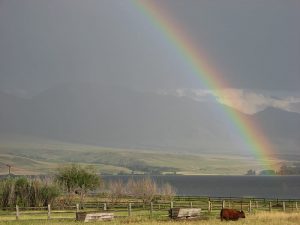
Rainbow over Ennis Lake
Although lacking in coding skills, even at the beginning I knew Big Sky Fishing would be far different from other fishing sites online, both then and now. I deliberately decided to prohibit flashy banners “above the fold.” I also prohibited pop-ups and other forms of intrusive advertising.
One of my finest creations for this site was the navigation system. From the very beginning, I knew Big Sky Fishing would grow to several thousand pages. Because of this, developing a functional navigation system was absolutely critical. As I write this in 2013, I am still extremely happy with how simple and intuitive the system I created in 2002 works today.
How many fishing web sites have you visited that have been mainly ads with about two sentences of helpful content or is nothing more than a glorified link library? Lots, I would imagine, as in my search of fishing websites I discovered that most of them are just about that – lots of ads and graphics and links with no content.
As a result, I designed this site to be exclusively a CONTENT site about Montana fishing and things related to fly fishing and Montana in general. While you will find some links to other fishing sites on the web here, this site is a content-based site. This site has more content than any other fishing website you will find, and more than many other travel/recreation based websites you have visited too, I suspect. Remember, those big “travel websites” like away.com and destination360.com have been labeled “content farms” for a reason, as nothing original grows there!
When I started this site there was a complete lack of photographs of Montana online. Today, in 2013, that has obviously changed. Yet the Big Sky Fishing.Com photo gallery is still, by far, the most organized source for Montana photos online. Photographs have been organized by topic and location, and are almost always fully annotated to provide information about the photo. This is in sharp contrast to the major photo sharing sites like Flickr, which have tons of so-so photographs that usually provide no information about the photo at all.
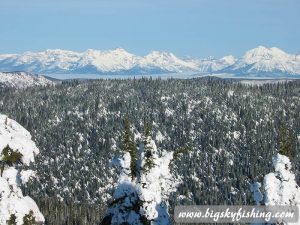
Glacier National Park Seen From Whitefish Mountain
Currently, something around 3000-4000 photographs of Montana are now online on Big Sky Fishing, organized in 150+ individual galleries. Photographs cover virtually everything about Montana; the rivers, the national parks, the cities and towns, the ski areas and, most recently, Montana’s scenic drives.
And unlike other web sites, every single photo on this website are original (that is, I took them all). Photos on Big Sky Fishing are not the over-used photos that are passed around from web site to web site.
Finally, this website will ALWAYS BE FREE. Unless a site has something very special to offer (the Wall Street Journal online comes to mind on this), paid websites stink. Their information is less than spectacular and their prices unreasonable. Big Sky Fsihing.Com has started out as a free website and will always be completely free. Likewise, there will never be a special member’s only page available to paying members. The entire Big Sky Fishing.Com site will always be free, period.
I work alone on this website. In other words, I do all the coding and all the content and all the photos and all the artwork and all the advertising, etc…Thus, I spend too much time in front of my computer. If you like this site, please contact me as I always love to hear good things about this site (keeps moral up on those long coding days!).
As of March 2013, Big Sky Fishing.Com spans, well, truthfully I don’t know how many pages! My guess is well over 6000 pages, but that is just a guess. I lost count of the number of pages on this site many years ago.
Beginning in 2018, Big Sky Fishing is finally – at long, overdue last – converting over to a Content Management System. This will make creating new content, and managing existing, far easier. Total page count will likely fall, as photographs are put into nice and functional lightbox galleries and many articles are combined. The new CMS is fully mobile friendly, too. Project is slated for completion by year’s end, but that might be wishful thinking. We’ll see.
Big Sky Fishing is a participant in the Amazon Services LLC Associates Program, an affiliate advertising program designed to provide a means for sites to earn advertising fees by advertising and linking to Amazon.Com.